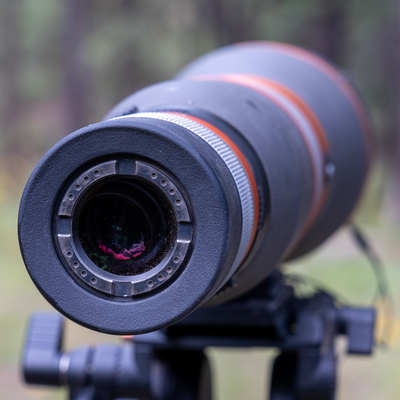
Digiscoping adapters are the bridge between a camera and a spotting scope, turning a simple observation tool into a powerful imaging system. Whether capturing soaring raptors, distant landscapes, or intricate wildlife details, the reliability of the adapter can make the difference between a crisp, usable photo and a missed opportunity. Regular maintenance not only extends the life of the equipment but also ensures consistent performance on every outing. Below is a comprehensive guide to keeping a digiscoping adapter in optimal condition, from routine cleaning to storage best practices.
Why Regular Maintenance Matters
Even the most robust adapters are subject to wear from environmental exposure, handling, and repeated assembly. Neglecting maintenance can lead to:
- Loose or misaligned connections that cause image distortion.
- Dust and moisture infiltration, which may damage electronic contacts.
- Corrosion on metal components, reducing structural integrity.
- Reduced battery life in adapters that draw power from the camera.
By incorporating a simple maintenance routine, photographers can avoid costly repairs and keep their gear ready for any field condition.
Step-by-Step Maintenance Routine
1. Pre-Use Inspection
- Visually examine the adapter for cracks, dents, or worn threads.
- Check the camera mount and scope ring for debris or foreign particles.
- Confirm that all locking mechanisms engage smoothly.
2. Cleaning the Optical Surfaces
Dust on the adapter’s lens or the spotting scope’s eyepiece can degrade image quality. Follow these steps:
- Use a soft, lint-free microfiber cloth to gently wipe away surface dust.
- If stubborn smudges remain, apply a few drops of optical-grade cleaning solution to the cloth, not directly to the lens.
- Wipe in a circular motion from the center outward to avoid streaks.
3. Maintaining Mechanical Connections
Metal threads and locking knobs benefit from occasional lubrication:
- Apply a thin layer of light, non-conductive grease to the threaded sections.
- Rotate the threads by hand to distribute the lubricant evenly.
- Avoid over-lubricating, which can attract dust.
4. Electrical Contact Care (for electronic adapters)
Adapters that transmit power or data between camera and scope have delicate contacts:
- Inspect contacts for oxidation; a faint green or brown film indicates corrosion.
- Use a dedicated contact cleaner or isopropyl alcohol on a cotton swab to gently remove buildup.
- Allow contacts to dry completely before reassembly.
5. Battery Management
If the adapter includes an internal battery or draws power from the camera, follow these guidelines:
- Charge batteries fully before long trips; avoid partial charges that can reduce lifespan.
- Store spare batteries in a cool, dry place, away from direct sunlight.
- Remove batteries if the adapter will not be used for an extended period.
Optimal Storage Practices
Proper storage protects the adapter from environmental stressors when not in use.
- Use a padded case: A hard-shell case with custom foam inserts prevents impact damage and keeps dust out.
- Control humidity: Include silica gel packets in the case to absorb moisture, especially in humid climates.
- Separate moving parts: Loosen locking rings slightly to relieve tension on threads during long-term storage.
Field Maintenance Tips
Outings can be unpredictable, so having a quick-access maintenance kit is essential.
- Carry a small microfiber cloth and a bottle of lens-safe cleaning fluid.
- Keep a compact screwdriver or hex key for adjusting lock screws on the fly.
- Include a spare set of batteries or a portable charger if the adapter relies on power.
Common Issues and Troubleshooting
Even with diligent care, problems can arise. Recognizing symptoms early helps prevent further damage.
Image Softness or Vignetting
- Check for misalignment between the camera sensor and the scope’s optical axis.
- Re-seat the adapter, ensuring all locks are fully engaged.
- If the problem persists, inspect the adapter’s internal optics for scratches.
Intermittent Camera Communication
- Verify that the electronic contacts are clean and free of debris.
- Test the adapter with a different camera body to isolate the issue.
- Consult the manufacturer’s firmware updates if the adapter includes software control.
Resources for Ongoing Learning
Staying informed about the latest maintenance techniques and equipment upgrades ensures long-term success. For detailed guides and expert recommendations, Discover expert strategies here. Additional insights on protecting gear in extreme environments can be found by Explore advanced guides and tips. If you’re interested in tailored maintenance solutions, Learn about our tailored solutions. For a broader perspective on equipment longevity, Find out more about this approach.
Final Checklist Before Every Outing
- Inspect adapter for physical damage.
- Clean optical surfaces and contacts.
- Lubricate threads lightly.
- Verify battery charge and connections.
- Pack a compact cleaning kit.
- Secure the adapter in a padded case with moisture control.
By integrating these maintenance habits into regular workflow, photographers can rely on their digiscoping adapters to perform flawlessly, capture stunning images, and endure the rigors of fieldwork for years to come.
About the Author